
Server Installation
Installation Environment
| Operating System | |
|---|---|
| Operating System | Linux series, AIX, HP-UX |
| CPU Architecture | ARM_64, X86_64 |
| Hardware Config | |
| Disk | 2GB or above |
| Memory | 500MB or above |
Installation Steps
- Extract the installation package: Copy the installation package to the user directory where you want to install the service, and extract it. The installation package file is as follows:
tar -xvf cir_linux_x.x.x.tar.gz
##----Linux system installation package, different packages for different systems
- Configure environment variables: In the installation user's directory, open
.bash_profileor.profileand configure environment variables as follows:
export TASKCTLDIR=$HOME/task --Installation directory
export PATH=$PATH:$TASKCTLDIR/bin:. --Execution bin directory
(After configuration, make the environment variables take effect: <re-login the user or use the source command>. Use echo $TASKCTLDIR to verify that it prints the environment variable value.)
- Run the installation program: Navigate to the
cirinstdirectory and execute theinstprogram.
cd cirinst && ./inst
Then the character-based installation interface will appear, as shown in the figure below:
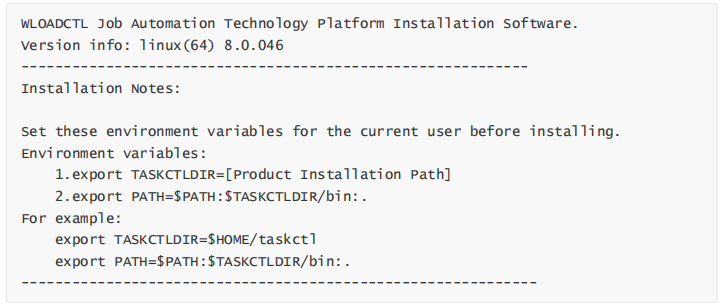
Click the Enter key, and the installation program will automatically check the user environment variables. If the TASKCTLDIR environment variable directory exists, it will continue. Otherwise, please configure the environment variables according to Step 2 and reinstall. After the check passes, the following interface will appear:
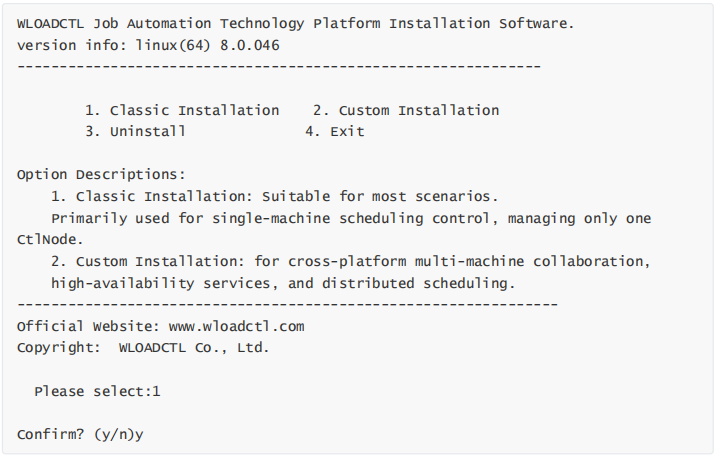
Here we select 1 for Typical Installation. The installation program will sequentially install the character-based client and the core scheduling service control node, and will ask you to enter the scheduling service node IP address and the service node listening port.
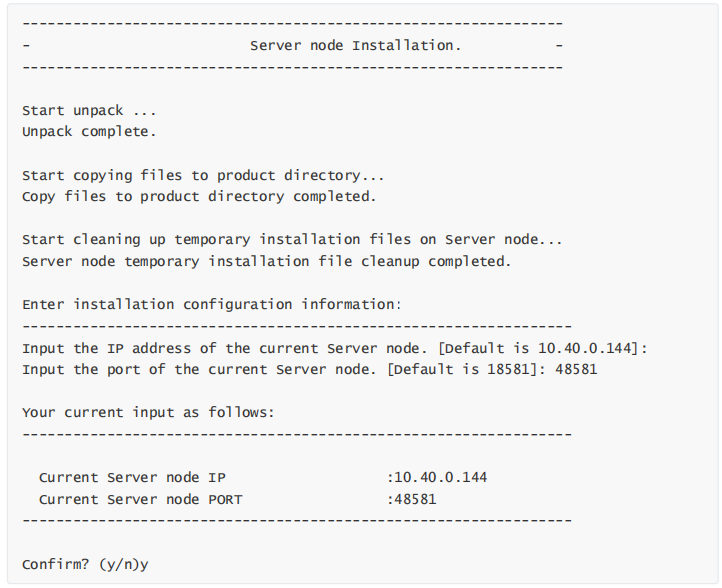
- IP Address: Use the IP address assigned by the administrator for the service node (must be the local machine IP address)
- Port: Use the port number assigned by the administrator for the service node (must be an unused port)
Next is whether to install examples. After selecting based on your needs, the service is installed and started.